
Signalling Processes with kill Commands : A Complete DevOps Guide 2025
Last Updated: August 2025 | Reading Time: 12 minutes
Process management stands as one of the fundamental pillars of system administration. Whether you’re troubleshooting a frozen application, gracefully shutting down services, or managing system resources, understanding how to properly signal processes can make the difference between a smooth operation and system chaos.
What Are Process Signals and Why They Matter
Process signals serve as the communication backbone between the operating system kernel and running processes. Think of them as specialized messages that tell processes how to behave – whether to pause, resume, terminate, or reload configuration files.
Every Linux and Unix-based system uses these signals for critical operations. When you press Ctrl+C to stop a running command, you’re actually sending a SIGINT signal. When systemd gracefully shuts down services during reboot, it’s orchestrating a carefully timed sequence of signals.
Understanding the kill Command Fundamentals
Despite its intimidating name, the kill command doesn’t always terminate processes. Instead, it sends signals to processes identified by their Process ID (PID). The basic syntax follows this pattern:
kill [signal] [PID]
Finding Process IDs
Before signalling any process, you need to locate its PID. Here are the most effective methods:
# Using ps command
ps aux | grep process_name

# Using pgrep for cleaner output
pgrep -f "process_name"

# Using pidof for exact matches
pidof apache2

# Using ps with specific formatting
ps -eo pid,ppid,cmd,%mem,%cpu --sort=-%mem | head
Pro Tip: Always verify the PID before sending signals, especially SIGKILL. Sending the wrong signal to the wrong process can cause system instability.
Complete Signal Reference Guide
Critical Signals Every DevOps Engineer Must Know
| Signal | Linux | BSD/macOS | Default Action | Use Case |
|---|---|---|---|---|
| SIGTERM | 15 | 15 | Terminate | Graceful shutdown |
| SIGKILL | 9 | 9 | Kill immediately | Force termination |
| SIGINT | 2 | 2 | Interrupt | User interrupt (Ctrl+C) |
| SIGHUP | 1 | 1 | Hangup | Reload configuration |
| SIGSTOP | 19 | 17 | Stop process | Pause execution |
| SIGCONT | 18 | 19 | Continue | Resume paused process |
| SIGUSR1 | 10 | 30 | User-defined | Custom application behavior |
| SIGUSR2 | 12 | 31 | User-defined | Custom application behavior |
| SIGCHLD | 17 | 20 | Ignore | Child process terminated |
| SIGPIPE | 13 | 13 | Terminate | Broken pipe |
Platform Note: Signal numbers can vary between Unix-like systems. Linux follows POSIX standards, while BSD derivatives (including macOS) may use different numbers. Always prefer symbolic names (SIGTERM) over numbers when possible, or use kill -l to list platform-specific signal numbers.
The SIGTERM vs SIGKILL Debate
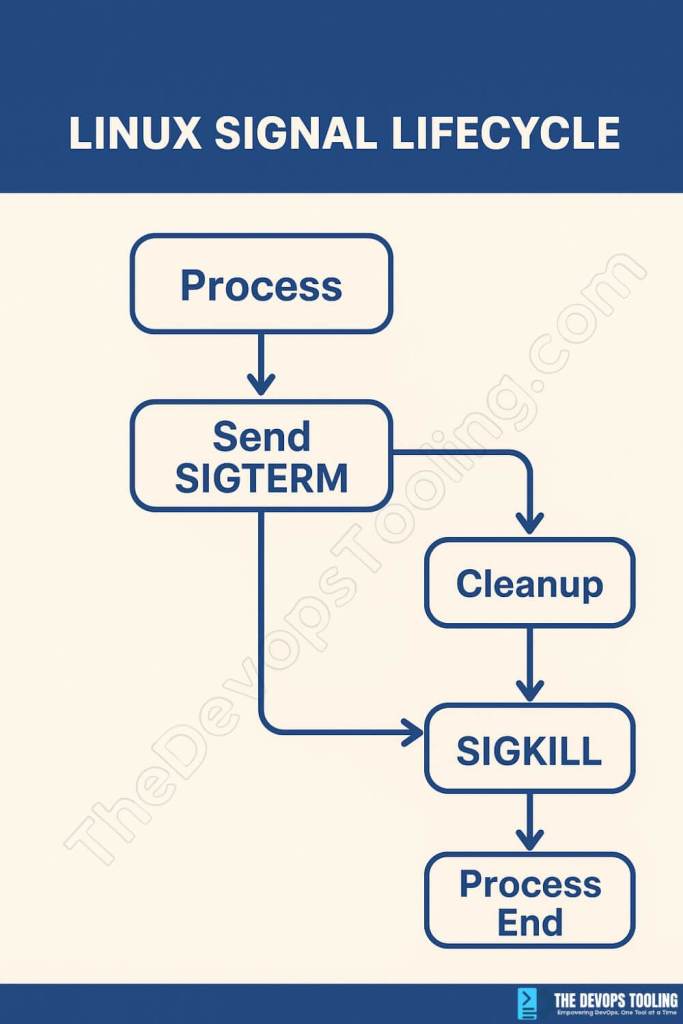
SIGTERM (15) represents the diplomatic approach to process termination:
kill -15 1234
# or simply
kill 1234
This signal allows processes to:
- Save current work
- Close file handles properly
- Release system resources
- Perform cleanup operations
- Log shutdown events
SIGKILL (9) is the nuclear option:
kill -9 1234
The kernel immediately terminates the process without any cleanup. Use this only when SIGTERM fails or when dealing with completely unresponsive processes.
Best Practice: Always try SIGTERM first, wait 10-15 seconds, then escalate to SIGKILL if necessary.
Practical Scenarios and Solutions
Scenario 1: Graceful Service Restart
#!/bin/bash
# Graceful service restart script
SERVICE_NAME="nginx"
PID=$(pidof $SERVICE_NAME)

if [ ! -z "$PID" ]; then
    echo "Sending SIGTERM to $SERVICE_NAME (PID: $PID)"
    kill -15 $PID

    # Wait for graceful shutdown
    for i in {1..10}; do
        if ! kill -0 $PID 2>/dev/null; then
            echo "Service stopped gracefully"
            break
        fi
        sleep 1
    done

    # Force kill if still running
    if kill -0 $PID 2>/dev/null; then
        echo "Forcing termination"
        kill -9 $PID
    fi
fi

# Restart service
systemctl start $SERVICE_NAME
Scenario 2: Configuration Reload Without Downtime
Many services support configuration reloading via SIGHUP:
# Reload Nginx configuration
sudo kill -HUP $(cat /var/run/nginx.pid)

# Reload Apache configuration
sudo kill -HUP $(cat /var/run/apache2/apache2.pid)

# Reload rsyslog configuration
sudo kill -HUP $(pidof rsyslogd)
Scenario 3: Debugging Hanging Processes
When processes become unresponsive, use these diagnostic signals:
# Send process information to logs
kill -USR1 $(pidof myapp)

# Generate core dump for analysis
kill -QUIT $(pidof problematic_process)

# Pause process for analysis
kill -STOP $(pidof suspicious_process)

# Resume after analysis
kill -CONT $(pidof suspicious_process)
Advanced kill Command Techniques
Using killall and pkill
For multiple processes sharing the same name:
# Kill all processes by name
killall -15 firefox

# Kill processes matching pattern
pkill -f "python.*script.py"

# Kill all processes for a specific user
pkill -u username -15

# Kill all processes in a process group
kill -15 -$(ps -o pgid= $PID | grep -o '[0-9]*')
Process Group Management
# Kill entire process group
kill -15 -$PGID

# Kill all child processes of a parent
pkill -P $PARENT_PID

# Kill process tree recursively
kill -15 $(pstree -p $PID | grep -o '([0-9]\+)' | grep -o '[0-9]\+')
Signal Handling in Scripts
Create robust scripts that handle signals properly:
#!/bin/bash
# Signal handling example

cleanup() {
    echo "Cleaning up..."
    # Perform cleanup operations
    exit 0
}

# Set signal handlers
trap cleanup SIGTERM SIGINT

# Main script logic
while true; do
    # Your application logic here
    sleep 1
done
Advanced Signal Handling Concepts
Signal Masks and Blocking Behavior
Processes can temporarily block signals using signal masks, which affects how system administrators interact with them:
# Check which signals a process has blocked
cat /proc/$PID/status | grep "Sig"
# SigBlk: Shows blocked signals (hexadecimal bitmask)
# SigIgn: Shows ignored signals
# SigCgt: Shows caught signals with custom handlers
Understanding signal blocking is crucial when processes don’t respond to expected signals:
#!/bin/bash
# Example: Process that blocks SIGTERM during critical operations
critical_operation() {
    # Block SIGTERM during critical section
    trap '' TERM
    echo "Performing critical operation..."
    sleep 10  # Simulate critical work

    # Restore SIGTERM handler
    trap 'cleanup; exit 0' TERM
    echo "Critical operation complete"
}
Signal Priority and Race Conditions
In high-load scenarios, signal delivery timing becomes critical:
Signal Queuing: Most Unix systems don’t queue identical signals. If a process receives multiple SIGUSR1 signals before handling the first, only one will be delivered.
Race Condition Example:
# Dangerous: Multiple rapid signals
for i in {1..10}; do
    kill -USR1 $PID &  # Background processes create race conditions
done

# Better: Sequential signaling with verification
for i in {1..10}; do
    kill -USR1 $PID
    sleep 0.1  # Allow signal processing time
done
Performance Impact Analysis
Different signal handling approaches have varying performance implications:
# Benchmark signal handling performance
benchmark_signal_handling() {
    local pid=$1
    local signal=$2
    local iterations=1000

    local start_time=$(date +%s.%N)

    for ((i=1; i<=iterations; i++)); do
        kill -$signal $pid
        # Measure response time if needed
    done

    local end_time=$(date +%s.%N)
    local duration=$(echo "$end_time - $start_time" | bc)

    echo "Sent $iterations signals in ${duration}s"
    echo "Average: $(echo "scale=6; $duration / $iterations" | bc)s per signal"
}
High-Throughput Considerations:
- Signal handlers should be async-safe and minimal
- Avoid complex operations in signal handlers
- Use self-pipe trick for complex signal handling
- Consider signalfd() on Linux for synchronous signal handling
Container and Modern Infrastructure Considerations
Docker and Kubernetes Signal Handling
Containers require special attention to signal handling due to PID namespace isolation:
# Proper Docker signal forwarding
FROM ubuntu:20.04
# Use exec form to ensure proper signal handling
CMD ["./myapp"]

# NOT: CMD ./myapp
# This creates a shell that doesn't forward signals properly
Multi-Process Containers: When running multiple processes, signal propagation becomes complex:
#!/bin/bash
# Signal-aware init script for multi-process containers
cleanup() {
    echo "Shutting down services..."
    kill -TERM $NGINX_PID $APP_PID
    wait $NGINX_PID $APP_PID
}

trap cleanup TERM INT

# Start services
nginx -g "daemon off;" &
NGINX_PID=$!

./myapp &
APP_PID=$!

# Wait for any process to exit
wait -n

# If we reach here, one process died - clean up others
cleanup
Container Orchestrator Signal Flow:
- Docker:
docker stop→ SIGTERM to PID 1 → Grace period → SIGKILL - Kubernetes: Pod termination → SIGTERM to container processes → Grace period → SIGKILL
- Docker Compose:
docker-compose stop→ SIGTERM to all containers → Grace period → SIGKILL
Advanced Kubernetes Signal Management
apiVersion: v1
kind: Pod
spec:
  terminationGracePeriodSeconds: 60
  containers:
  - name: myapp
    image: myapp:latest
    lifecycle:
      preStop:
        exec:
          command: ["/bin/sh", "-c", "kill -USR1 1; sleep 30"]  # Custom pre-stop hook
Signal Propagation in Sidecar Patterns:
# Envoy sidecar with proper signal handling
apiVersion: v1
kind: Pod
spec:
  shareProcessNamespace: true  # Allows signal sharing between containers
  containers:
  - name: app
    image: myapp:latest
  - name: envoy
    image: envoyproxy/envoy:latest
Kubernetes Pod Termination
Understanding Kubernetes termination sequence:
- SIGTERM sent to main container process
- Grace period begins (default 30 seconds)
- SIGKILL sent if process hasn’t terminated
apiVersion: v1
kind: Pod
spec:
  terminationGracePeriodSeconds: 60  # Extend if needed
  containers:
  - name: myapp
    image: myapp:latest
Advanced Troubleshooting and Diagnostics
Debugging Unresponsive Processes
When processes don’t respond to signals, systematic debugging is essential:
# Comprehensive process analysis
debug_unresponsive_process() {
    local pid=$1

    echo "=== Process State Analysis ==="
    cat /proc/$pid/status | grep -E "State|Sig"

    echo "=== Process Stack Trace ==="
    cat /proc/$pid/stack 2>/dev/null || echo "Stack unavailable"

    echo "=== Open File Descriptors ==="
    lsof -p $pid | head -20

    echo "=== System Call Trace ==="
    timeout 10 strace -p $pid 2>&1 | head -20

    echo "=== Memory Maps ==="
    cat /proc/$pid/maps | head -10
}
Process State Deep Dive:
# Interpret process states
check_process_state() {
    local pid=$1
    local state=$(cat /proc/$pid/stat 2>/dev/null | awk '{print $3}')

    case $state in
        "D") echo "Process $pid in uninterruptible sleep (waiting for I/O)" ;;
        "Z") echo "Process $pid is zombie (parent hasn't reaped it)" ;;
        "T") echo "Process $pid is stopped (SIGSTOP or debugger)" ;;
        "S") echo "Process $pid in interruptible sleep" ;;
        "R") echo "Process $pid is running or runnable" ;;
        *) echo "Process $pid in unknown state: $state" ;;
    esac
}
Advanced strace Techniques
# Monitor signal handling in real-time
strace_signals() {
    local pid=$1
    echo "Monitoring signal handling for PID $pid..."

    # Trace signal-related system calls
    strace -p $pid -e trace=signal,kill,tkill,tgkill -o signal_trace.log &
    local strace_pid=$!

    # Let it run for analysis period
    sleep 30
    kill $strace_pid

    echo "Signal trace analysis:"
    cat signal_trace.log | grep -E "SIG|kill"
}

# Identify blocking system calls
find_blocking_calls() {
    local pid=$1

    # Sample system calls over time
    for i in {1..10}; do
        echo "Sample $i:"
        timeout 1 strace -p $pid -c 2>&1 | grep -v "+++ exited"
        sleep 2
    done
}
Orphaned Process Detection and Management
# Find processes that should have been terminated
find_orphaned_processes() {
    local service_name=$1

    echo "=== Checking for orphaned $service_name processes ==="

    # Find processes by name that aren't managed by systemd
    local orphans=$(pgrep -f "$service_name" | while read pid; do
        local cgroup=$(cat /proc/$pid/cgroup 2>/dev/null | grep systemd)
        if [[ -z "$cgroup" ]]; then
            echo $pid
        fi
    done)

    if [[ -n "$orphans" ]]; then
        echo "Found orphaned processes:"
        ps -p $orphans -o pid,ppid,cmd,etime

        echo "Attempting graceful cleanup..."
        for pid in $orphans; do
            kill -TERM $pid
        done

        sleep 5

        # Force cleanup if necessary
        for pid in $orphans; do
            if kill -0 $pid 2>/dev/null; then
                echo "Force killing stubborn process $pid"
                kill -KILL $pid
            fi
        done
    else
        echo "No orphaned processes found"
    fi
}
Problem: Process Ignoring SIGTERM
Solution: Check if the process has custom signal handlers:
# Check process signal handling
cat /proc/$PID/status | grep -i sig

# List open file descriptors
lsof -p $PID

# Use strace to monitor system calls
strace -p $PID
Problem: Zombie Processes
Zombie processes cannot be killed because they’re already dead:
# Identify zombie processes
ps aux | grep -w Z

# Kill parent process to clean up zombies
kill -15 $PARENT_PID
Problem: Permission Denied
# Check process ownership
ps -eo pid,user,cmd | grep $PID

# Use sudo if necessary
sudo kill -15 $PID

# Or switch to process owner
sudo -u process_owner kill -15 $PID
Modern Systemd Integration
Advanced Signal Handling in Unit Files
Systemd provides sophisticated signal management beyond basic service control:
[Unit]
Description=Advanced Signal Handling Service
After=network.target

[Service]
Type=notify
ExecStart=/usr/local/bin/myapp
ExecReload=/bin/kill -HUP $MAINPID
ExecStop=/bin/kill -TERM $MAINPID
KillMode=mixed
KillSignal=SIGTERM
TimeoutStopSec=30
RestartSec=5
Restart=always

# Advanced signal configuration
SendSIGHUP=yes
SendSIGKILL=yes
FinalKillSignal=SIGKILL

[Install]
WantedBy=multi-user.target
KillMode Options Explained:
control-group: Kill all processes in the service’s cgroupmixed: Send SIGTERM to main process, SIGKILL to remaining processesprocess: Only signal the main processnone: Don’t kill any processes
Custom Signal Handling Scripts
#!/bin/bash
# Advanced systemd-aware signal handler
# Place in /usr/local/bin/service-manager.sh

SERVICE_NAME="myapp"
PID_FILE="/var/run/$SERVICE_NAME.pid"
CONFIG_FILE="/etc/$SERVICE_NAME.conf"

handle_reload() {
    echo "$(date): Configuration reload requested" | systemd-cat -t $SERVICE_NAME

    # Validate config before reloading
    if /usr/local/bin/myapp --test-config $CONFIG_FILE; then
        kill -HUP $(cat $PID_FILE)
        systemd-notify --status="Configuration reloaded at $(date)"
    else
        echo "$(date): Invalid configuration, reload aborted" | systemd-cat -t $SERVICE_NAME -p err
        exit 1
    fi
}

handle_stop() {
    echo "$(date): Graceful shutdown initiated" | systemd-cat -t $SERVICE_NAME

    # Custom pre-shutdown tasks
    /usr/local/bin/myapp --prepare-shutdown

    # Send SIGTERM and wait
    kill -TERM $(cat $PID_FILE)

    # Wait for graceful shutdown
    local timeout=25
    while [[ $timeout -gt 0 ]] && kill -0 $(cat $PID_FILE) 2>/dev/null; do
        sleep 1
        ((timeout--))
    done

    if kill -0 $(cat $PID_FILE) 2>/dev/null; then
        echo "$(date): Force killing after timeout" | systemd-cat -t $SERVICE_NAME -p warning
        kill -KILL $(cat $PID_FILE)
    fi

    systemd-notify --status="Service stopped"
}

case "$1" in
    reload) handle_reload ;;
    stop) handle_stop ;;
    *) echo "Usage: $0 {reload|stop}" ;;
esac
Signal Security Considerations
- Never use SIGKILL as first option – it can corrupt data
- Validate PIDs before signalling – wrong PID can affect system processes
- Use process names when possible – reduces risk of targeting wrong PID
- Implement proper signal handlers – in your applications
- Monitor signal effectiveness – ensure processes respond appropriately
Production Environment Guidelines
# Create a safe kill function
safe_kill() {
    local pid=$1
    local signal=${2:-15}

    # Validate PID exists and is accessible
    if ! kill -0 $pid 2>/dev/null; then
        echo "Process $pid not found or not accessible"
        return 1
    fi

    # Get process information
    local process_info=$(ps -p $pid -o comm=)
    echo "Signalling process $pid ($process_info) with signal $signal"

    # Send signal
    kill -$signal $pid

    # Verify result
    sleep 2
    if kill -0 $pid 2>/dev/null; then
        echo "Process $pid still running"
        return 1
    else
        echo "Process $pid terminated successfully"
        return 0
    fi
}
Performance Monitoring and Signal Analytics
Tracking Signal Effectiveness
# Monitor process termination times
time_graceful_shutdown() {
    local pid=$1
    local start_time=$(date +%s)

    kill -15 $pid

    while kill -0 $pid 2>/dev/null; do
        sleep 0.1
    done

    local end_time=$(date +%s)
    echo "Shutdown took $((end_time - start_time)) seconds"
}
System Signal Statistics
# Monitor system-wide signal activity
# Check dmesg for signal-related kernel messages
dmesg | grep -i signal

# Monitor signal handling with auditd
sudo auditctl -a always,exit -F arch=b64 -S kill -S tkill -S tgkill
Frequently Asked Questions
What happens if I send SIGKILL to PID 1?
This will crash your system. PID 1 (init/systemd) cannot be killed by design.
Can I send signals to processes I don’t own?
Only root can send signals to processes owned by other users.
Why doesn’t SIGKILL work on my process?
SIGKILL cannot be ignored or handled. If it appears to “not work,” the process is likely stuck in kernel space (D state) and will terminate once it returns to user space.
How do I handle signals in my application?
Implement signal handlers using your programming language’s signal handling mechanisms. Always handle at least SIGTERM for graceful shutdown.
What’s the difference between kill and killall?
kill targets specific PIDs, while killall targets all processes with a matching name.
Summary and Key Takeaways
Mastering process signalling transforms you from a basic user into a systems administrator who can elegantly manage complex process lifecycles. Remember these essential points:
- Always prefer SIGTERM over SIGKILL for graceful shutdowns
- Verify PIDs before sending any signals
- Understand your application’s signal handling behavior
- Implement proper signal handlers in your own applications
- Use appropriate tools (ps, pgrep, pidof) to locate processes accurately
- Consider container and orchestration platform signal propagation
The kill command represents more than just process termination – it’s your primary interface for sophisticated process lifecycle management. Whether you’re managing a single server or orchestrating containerized microservices, these principles remain foundational to reliable system operations.
Quick Reference Cheat Sheet
Essential Commands
# Basic signal sending
kill -TERM $PID          # Graceful termination
kill -KILL $PID          # Force termination
kill -HUP $PID           # Reload configuration
kill -STOP $PID          # Pause process
kill -CONT $PID          # Resume process

# Process discovery
ps aux | grep process    # Find by name
pgrep -f "pattern"       # Pattern matching
pidof process_name       # Exact name match
ps -eo pid,cmd,%mem      # Custom format

# Mass operations
killall -TERM firefox    # Kill all by name
pkill -u username        # Kill by user
pkill -f "python.*"      # Kill by pattern
kill -TERM -$PGID        # Kill process group
Platform-Specific Signal Numbers
# Linux
SIGTERM=15, SIGKILL=9, SIGHUP=1, SIGINT=2
SIGSTOP=19, SIGCONT=18, SIGUSR1=10, SIGUSR2=12

# BSD/macOS
SIGTERM=15, SIGKILL=9, SIGHUP=1, SIGINT=2
SIGSTOP=17, SIGCONT=19, SIGUSR1=30, SIGUSR2=31

# List all signals on current system
kill -l
Troubleshooting Commands
# Process state analysis
cat /proc/$PID/status | grep -E "State|Sig"
cat /proc/$PID/stack
lsof -p $PID

# Signal tracing
strace -p $PID -e trace=signal
timeout 10 strace -p $PID

# System monitoring
dmesg | grep -i signal
ps -eo pid,stat,comm | grep "^[0-9]* [DZ]"
Docker/Container Commands
# Proper signal forwarding
CMD ["./app"]            # Use exec form
STOPSIGNAL SIGTERM       # Set custom stop signal

# Container debugging
docker exec $CONTAINER ps aux
docker logs --tail 50 $CONTAINER
kubectl logs pod-name --previous
Systemd Integration
# Service management with signals
systemctl reload service    # Send SIGHUP
systemctl stop service      # Graceful stop
systemctl kill service      # Send specific signal

# Custom signals via systemd
systemd-run --uid=user kill -USR1 $PID
Emergency Procedures
# When SIGTERM fails
kill -TERM $PID; sleep 10; kill -KILL $PID

# Zombie cleanup
kill -TERM $PARENT_PID

# Mass cleanup
pkill -f "pattern" -TERM; sleep 5; pkill -f "pattern" -KILL

# System-wide process cleanup
sudo pkill -STOP -f "runaway_process"  # Pause first
sudo pkill -TERM -f "runaway_process"  # Then terminate
Best Practice Checklist
- ✅ Always try SIGTERM before SIGKILL
- ✅ Verify PID before sending signals
- ✅ Use symbolic names instead of numbers
- ✅ Implement proper signal handlers in applications
- ✅ Test signal handling in development
- ✅ Monitor signal effectiveness in production
- ✅ Document signal behavior for your services
- ❌ Never use SIGKILL as first option
- ❌ Don’t ignore signal handler implementation
- ❌ Avoid hardcoded signal numbers in scripts
Have questions about process signalling or want to share your own experiences? Connect with us in the comments below. For more DevOps insights and practical guides, subscribe to our newsletter and follow thedevopstooling.com.