
Mastering GitHub Actions Contexts (2025): Common Mistakes and Best Practices
Featured Snippet Definition
GitHub Actions contexts are dynamic objects that provide metadata and variables about the workflow run, event, jobs, and environment. They are accessed using the ${{ }} expression syntax and allow you to write conditional logic, reuse data, and securely manage workflow behavior.
Quick Formula:
Event ➜ Context ➜ Expression (${{ }}) ➜ Workflow logic
Introduction: Why Contexts Matter in Your CI/CD Pipeline
When you first start writing GitHub Actions workflows, you quickly realize that hardcoding values and creating static pipelines limits what you can accomplish. What happens when you need to deploy only from the main branch? How do you access the pull request number for dynamic labeling? What if you need different behavior based on who triggered the workflow?
This is precisely where GitHub Actions contexts become indispensable. Contexts transform your workflows from rigid scripts into intelligent, adaptive automation systems that respond dynamically to their environment and triggering events.
Contexts solve critical real-world problems that every DevOps engineer encounters. They enable branch-based deployment logic, allowing you to push to staging from feature branches while reserving production deployments for your main branch. They provide secure variable handling through the secrets context, ensuring sensitive data never accidentally leaks into logs. They facilitate job dependencies through the needs context, letting you pass outputs between jobs and create sophisticated multi-stage pipelines.
Throughout this guide, you’ll progress from understanding the fundamentals of what contexts are and how the expression syntax works, through advanced conditional logic and cross-job data propagation, all the way to debugging strategies and battle-tested best practices. Every concept includes annotated YAML examples you can copy directly into your workflows, realistic output samples, and explanations of common pitfalls to avoid.
By mastering GitHub Actions contexts, you gain the ability to write workflows that are not only more powerful but also more maintainable, secure, and aligned with modern DevOps practices.
What Are Contexts and How They Work
At their core, contexts in GitHub Actions are structured data objects that the workflow engine makes available during workflow execution. Think of them as readonly information packages that describe different aspects of your workflow run, from which repository triggered it to what operating system your job is running on.
The defining characteristic of contexts is how you access them through the expression syntax using double curly braces wrapped in dollar signs: ${{ }}. When the GitHub Actions workflow engine parses your workflow file, it evaluates these expressions before your job’s shell commands ever execute. This is a crucial distinction that trips up many engineers initially.
Understanding the relationship between contexts, environment variables, and expressions requires grasping the execution timeline. When a workflow triggers, GitHub Actions first evaluates all context expressions in your YAML file. These evaluated values might become environment variables or be used in conditional logic. Only after this evaluation phase does the actual shell execution begin, where traditional environment variables become accessible through your shell’s syntax like $MY_VAR in bash.
Let’s examine a concrete example that illustrates these differences:
name: Context vs Environment Variable Demo
on: push

env:
  # Workflow-level environment variable set using a context
  WORKFLOW_BRANCH: ${{ github.ref_name }}
  STATIC_VALUE: "hardcoded-string"

jobs:
  demonstrate-differences:
    runs-on: ubuntu-latest
    env:
      # Job-level environment variable
      JOB_COMMIT: ${{ github.sha }}

    steps:
      - name: Handle release event
        if: ${{ github.event_name == 'release' }}
        run: |
          echo "Release: ${{ github.event.release.tag_name }}"
          echo "Release name: ${{ github.event.release.name }}"
          echo "Prerelease: ${{ github.event.release.prerelease }}"

      - name: Universal properties (available in all events)
        run: |
          echo "Repository: ${{ github.repository }}"
          echo "Actor: ${{ github.actor }}"
          echo "Workflow: ${{ github.workflow }}"
Secret Security Best Practices
The secrets context requires extra care to prevent accidental exposure and ensure secure credential handling.
name: Secure Secret Handling
on: push

jobs:
  secure-secrets:
    runs-on: ubuntu-latest
    steps:
      # BEST PRACTICE: Pass secrets as environment variables
      - name: Correct secret usage
        env:
          API_KEY: ${{ secrets.API_KEY }}
          DB_PASSWORD: ${{ secrets.DATABASE_PASSWORD }}
        run: |
          # Use the environment variable, never echo the secret
          curl -H "Authorization: Bearer $API_KEY" https://api.example.com

      # AVOID: Direct secret reference in run commands
      - name: Avoid this pattern
        run: |
          # This works but is less secure
          # curl -H "Authorization: Bearer ${{ secrets.API_KEY }}" https://api.example.com
          echo "Use environment variables instead"

      # BEST PRACTICE: Check secret existence before use
      - name: Conditional execution based on secret availability
        if: ${{ secrets.DEPLOY_KEY != '' }}
        env:
          DEPLOY_KEY: ${{ secrets.DEPLOY_KEY }}
        run: echo "Deployment key configured"

      # BEST PRACTICE: Never log secret values
      - name: Safe secret verification
        env:
          SECRET_TOKEN: ${{ secrets.SECRET_TOKEN }}
        run: |
          # Check if set without revealing value
          if [[ -n "$SECRET_TOKEN" ]]; then
            echo "✓ Secret token is configured"
          else
            echo "✗ Secret token is missing"
            exit 1
          fi

      # BEST PRACTICE: Limit secret scope to necessary steps
      - name: Build step (no secrets needed)
        run: npm run build

      - name: Deploy step (secrets only here)
        env:
          DEPLOY_TOKEN: ${{ secrets.DEPLOY_TOKEN }}
        run: |
          # Secrets only exposed in steps that need them
          ./deploy.sh
Keep Workflows Understandable
Complex nested expressions and intricate conditional logic quickly become maintenance nightmares. Prioritize clarity.
name: Maintainable Workflow Structure
on: [push, pull_request]

env:
  # Define constants at top level for reusability
  PRODUCTION_BRANCH: main
  STAGING_BRANCH: develop

jobs:
  # GOOD: Clear job-level conditions
  build:
    runs-on: ubuntu-latest
    steps:
      - uses: actions/checkout@v4
      - name: Build
        run: npm run build

  # GOOD: Descriptive job names with clear conditions
  deploy-to-production:
    needs: build
    if: github.ref == 'refs/heads/main' && github.event_name == 'push'
    runs-on: ubuntu-latest
    environment: production
    steps:
      - name: Deploy
        run: echo "Deploying to production"

  deploy-to-staging:
    needs: build
    if: github.ref == 'refs/heads/develop' && github.event_name == 'push'
    runs-on: ubuntu-latest
    environment: staging
    steps:
      - name: Deploy
        run: echo "Deploying to staging"

  # AVOID: Overly complex nested conditions
  # complicated-job:
  #   if: |
  #     (github.event_name == 'push' && (github.ref == 'refs/heads/main' ||
  #     (github.ref == 'refs/heads/develop' && github.actor != 'dependabot[bot]') ||
  #     startsWith(github.ref, 'refs/heads/release/')) &&
  #     github.repository == 'thedevopstooling/app') ||
  #     (github.event_name == 'pull_request' && !contains(github.event.pull_request.labels.*.name, 'skip-ci'))

  # BETTER: Break into multiple jobs or use job outputs for complex logic
  evaluate-deployment:
    runs-on: ubuntu-latest
    outputs:
      should-deploy: ${{ steps.check.outputs.should-deploy }}
      environment: ${{ steps.check.outputs.environment }}
    steps:
      - name: Evaluate deployment conditions
        id: check
        run: |
          SHOULD_DEPLOY="false"
          ENVIRONMENT="none"

          if [[ "${{ github.ref }}" == "refs/heads/main" ]]; then
            SHOULD_DEPLOY="true"
            ENVIRONMENT="production"
          elif [[ "${{ github.ref }}" == "refs/heads/develop" ]]; then
            SHOULD_DEPLOY="true"
            ENVIRONMENT="staging"
          fi

          echo "should-deploy=$SHOULD_DEPLOY" >> $GITHUB_OUTPUT
          echo "environment=$ENVIRONMENT" >> $GITHUB_OUTPUT

  deploy:
    needs: evaluate-deployment
    if: needs.evaluate-deployment.outputs.should-deploy == 'true'
    runs-on: ubuntu-latest
    environment: ${{ needs.evaluate-deployment.outputs.environment }}
    steps:
      - name: Deploy
        run: echo "Deploying to ${{ needs.evaluate-deployment.outputs.environment }}"
Real-World Examples and Templates
Theory becomes practical through concrete, copy-paste-ready examples that solve common DevOps challenges.
Example 1: Print Branch Name and Commit Info
name: Basic Context Information
on: [push, pull_request]

jobs:
  show-info:
    runs-on: ubuntu-latest
    steps:
      - name: Display git context
        run: |
          echo "=== Git Information ==="
          echo "Branch: ${{ github.ref_name }}"
          echo "Full ref: ${{ github.ref }}"
          echo "Commit SHA: ${{ github.sha }}"
          echo "Short SHA: ${GITHUB_SHA:0:7}"
          echo ""
          echo "=== Event Information ==="
          echo "Event: ${{ github.event_name }}"
          echo "Actor: ${{ github.actor }}"
          echo "Repository: ${{ github.repository }}"
Output Example:
=== Git Information ===
Branch: feature/add-caching
Full ref: refs/heads/feature/add-caching
Commit SHA: a1b2c3d4e5f6g7h8i9j0k1l2m3n4o5p6q7r8s9t0
Short SHA: a1b2c3d

=== Event Information ===
Event: push
Actor: johndoe
Repository: thedevopstooling/demo-repo
Example 2: Run Jobs Only on Pull Requests from Forks
name: Fork-Specific Security Workflow
on:
  pull_request:
    types: [opened, synchronize, reopened]

jobs:
  public-checks:
    # Always run for all PRs
    runs-on: ubuntu-latest
    steps:
      - uses: actions/checkout@v4

      - name: Run public security checks
        run: |
          echo "Running security checks safe for forks"
          npm audit

  fork-pr-notification:
    # Only run for PRs from forks
    if: github.event.pull_request.head.repo.full_name != github.repository
    runs-on: ubuntu-latest
    steps:
      - name: Notify about fork PR
        run: |
          echo "⚠️  This is a pull request from a fork"
          echo "Repository: ${{ github.event.pull_request.head.repo.full_name }}"
          echo "Branch: ${{ github.head_ref }}"
          echo "Limited access to secrets for security"

  trusted-checks:
    # Only run for PRs from same repository
    if: github.event.pull_request.head.repo.full_name == github.repository
    runs-on: ubuntu-latest
    steps:
      - uses: actions/checkout@v4

      - name: Run trusted checks with secrets
        env:
          SECURITY_SCAN_TOKEN: ${{ secrets.SECURITY_SCAN_TOKEN }}
        run: |
          echo "Running advanced security scan"
          echo "Access to secrets: enabled"
          # Advanced scanning with credentials
Example 3: Gated Deployment Based on Inputs and Secrets
name: Gated Production Deployment
on:
  workflow_dispatch:
    inputs:
      environment:
        description: 'Target environment'
        required: true
        type: choice
        options:
          - staging
          - production
      confirm-production:
        description: 'Type CONFIRM to deploy to production'
        required: false
        type: string

jobs:
  validate-deployment:
    runs-on: ubuntu-latest
    outputs:
      can-deploy: ${{ steps.validate.outputs.can-deploy }}
    steps:
      - name: Validate deployment request
        id: validate
        run: |
          CAN_DEPLOY="false"

          # Staging can always deploy
          if [[ "${{ inputs.environment }}" == "staging" ]]; then
            CAN_DEPLOY="true"
            echo "✓ Staging deployment approved"
          fi

          # Production requires confirmation
          if [[ "${{ inputs.environment }}" == "production" ]]; then
            if [[ "${{ inputs.confirm-production }}" == "CONFIRM" ]]; then
              CAN_DEPLOY="true"
              echo "✓ Production deployment confirmed"
            else
              echo "✗ Production deployment requires CONFIRM input"
            fi
          fi

          echo "can-deploy=$CAN_DEPLOY" >> $GITHUB_OUTPUT

  deploy:
    needs: validate-deployment
    if: needs.validate-deployment.outputs.can-deploy == 'true'
    runs-on: ubuntu-latest
    environment: ${{ inputs.environment }}
    steps:
      - name: Check required secrets
        env:
          DEPLOY_KEY: ${{ secrets.DEPLOY_KEY }}
        run: |
          if [[ -z "$DEPLOY_KEY" ]]; then
            echo "✗ DEPLOY_KEY secret not configured"
            exit 1
          fi
          echo "✓ Required secrets configured"

      - name: Deploy to ${{ inputs.environment }}
        env:
          DEPLOY_KEY: ${{ secrets.DEPLOY_KEY }}
          DEPLOY_URL: ${{ inputs.environment == 'production' && 'https://app.example.com' || 'https://staging.example.com' }}
        run: |
          echo "Deploying to ${{ inputs.environment }}"
          echo "Target URL: $DEPLOY_URL"
          echo "Triggered by: ${{ github.actor }}"
          # Deployment commands here
Example 4: Feature Branch Logic with startsWith
name: Feature Branch Development Workflow
on:
  push:
    branches:
      - 'feature/**'
      - 'bugfix/**'
      - 'hotfix/**'

jobs:
  feature-build:
    # Run for feature and bugfix branches
    if: startsWith(github.ref, 'refs/heads/feature/') || startsWith(github.ref, 'refs/heads/bugfix/')
    runs-on: ubuntu-latest
    steps:
      - uses: actions/checkout@v4

      - name: Build and test feature
        run: |
          echo "Building feature branch: ${{ github.ref_name }}"
          npm install
          npm run build
          npm test

      - name: Create preview environment
        run: |
          # Create safe branch name for URL
          BRANCH_SLUG=$(echo "${{ github.ref_name }}" | sed 's/\//-/g' | tr '[:upper:]' '[:lower:]')
          PREVIEW_URL="https://${BRANCH_SLUG}.preview.example.com"

          echo "Preview URL: $PREVIEW_URL"
          echo "PREVIEW_URL=$PREVIEW_URL" >> $GITHUB_ENV

      - name: Comment preview URL
        run: |
          echo "Preview environment will be available at: $PREVIEW_URL"

  hotfix-urgent:
    # Hotfixes get expedited treatment
    if: startsWith(github.ref, 'refs/heads/hotfix/')
    runs-on: ubuntu-latest
    steps:
      - uses: actions/checkout@v4

      - name: Urgent hotfix build
        run: |
          echo "🚨 HOTFIX branch detected: ${{ github.ref_name }}"
          echo "Expedited build and testing"
          npm run build
          npm run test:critical

      - name: Notify team
        run: |
          echo "Notifying team about hotfix: ${{ github.ref_name }}"
          echo "Triggered by: ${{ github.actor }}"
Example 5: Multi-Environment Deployment Template
name: Multi-Environment Deployment Pipeline
on:
  push:
    branches:
      - main
      - develop
      - 'release/**'

jobs:
  build:
    runs-on: ubuntu-latest
    outputs:
      version: ${{ steps.version.outputs.version }}
      artifact: ${{ steps.artifact.outputs.name }}
    steps:
      - uses: actions/checkout@v4

      - name: Generate version
        id: version
        run: |
          if [[ "${{ github.ref_name }}" == "main" ]]; then
            VERSION="1.${{ github.run_number }}.0"
          elif [[ "${{ github.ref_name }}" == "develop" ]]; then
            VERSION="1.${{ github.run_number }}.0-dev"
          else
            VERSION="1.${{ github.run_number }}.0-rc"
          fi
          echo "version=$VERSION" >> $GITHUB_OUTPUT
          echo "Generated version: $VERSION"

      - name: Build application
        id: artifact
        run: |
          ARTIFACT="app-${{ steps.version.outputs.version }}.tar.gz"
          echo "Building $ARTIFACT"
          echo "name=$ARTIFACT" >> $GITHUB_OUTPUT

  deploy-dev:
    needs: build
    if: github.ref_name == 'develop'
    runs-on: ubuntu-latest
    environment:
      name: development
      url: https://dev.example.com
    steps:
      - name: Deploy to development
        run: |
          echo "Deploying ${{ needs.build.outputs.artifact }}"
          echo "Version: ${{ needs.build.outputs.version }}"
          echo "Environment: Development"

  deploy-staging:
    needs: build
    if: startsWith(github.ref, 'refs/heads/release/')
    runs-on: ubuntu-latest
    environment:
      name: staging
      url: https://staging.example.com
    steps:
      - name: Deploy to staging
        run: |
          echo "Deploying ${{ needs.build.outputs.artifact }}"
          echo "Version: ${{ needs.build.outputs.version }}"
          echo "Environment: Staging"

  deploy-production:
    needs: build
    if: github.ref_name == 'main'
    runs-on: ubuntu-latest
    environment:
      name: production
      url: https://example.com
    steps:
      - name: Deploy to production
        env:
          PROD_DEPLOY_KEY: ${{ secrets.PRODUCTION_DEPLOY_KEY }}
        run: |
          echo "Deploying ${{ needs.build.outputs.artifact }}"
          echo "Version: ${{ needs.build.outputs.version }}"
          echo "Environment: Production"
          echo "Deployed by: ${{ github.actor }}"
Conclusion and Practical Checklist
GitHub Actions contexts transform static workflow files into intelligent automation systems that adapt to their execution environment, respond to different events, and make decisions based on runtime data. Throughout this guide, we’ve explored how contexts provide the foundation for dynamic logic, secure credential management, and sophisticated multi-job pipelines.
The power of contexts lies not just in accessing metadata but in using that metadata to create workflows that are both flexible and maintainable. By combining context expressions with conditional logic, you can implement branch-based deployments, fork-aware security checks, and environment-specific configurations without external scripts or complex tooling.
Pre-Deployment Context Checklist
Before deploying workflows that use contexts, validate your implementation against this checklist:
Context Property Validation:
- ✓ Is the context property valid for all trigger events in your workflow?
- ✓ Have you verified the property exists in the event type documentation?
- ✓ Are event-specific properties (like
pull_request.number) only accessed when that event triggers?
Fallback and Error Handling:
- ✓ Do you have fallback values for optional properties using
||operator? - ✓ Are conditional steps protected with proper
ifconditions? - ✓ Have you tested scenarios where context properties might be undefined?
Security Considerations:
- ✓ Are secrets passed as environment variables rather than directly in commands?
- ✓ Have you verified that secrets are never echoed to logs?
- ✓ Are fork pull requests handled with appropriate permission restrictions?
- ✓ Do production deployments have additional validation gates?
Readability and Maintenance:
- ✓ Are complex context expressions extracted to job outputs or environment variables?
- ✓ Do job and step names clearly indicate their purpose?
- ✓ Is conditional logic broken into manageable, understandable chunks?
- ✓ Have you documented any non-obvious context usage?
Testing and Debugging:
- ✓ Have you used
toJSON()to inspect context structures during development? - ✓ Are error messages clear when context-based validation fails?
- ✓ Have you tested all code paths triggered by different context values?
Audit Your Existing Workflows
Take time to review your current workflows for context misuse or missed opportunities. Look for hardcoded values that could be dynamic, overly complex conditional logic that could be simplified, or security issues where secrets aren’t properly scoped. Modern GitHub Actions workflows leverage contexts not as an advanced feature but as a fundamental building block for intelligent automation.
The journey to mastering GitHub Actions contexts is iterative. Start by replacing hardcoded branch names with github.ref_name. Progress to implementing conditional deployments. Eventually, you’ll build sophisticated pipelines that propagate data between jobs, adapt to different environments, and provide the dynamic behavior modern DevOps demands.
How to Use GitHub Actions Contexts Step by Step
Follow this step-by-step process to implement contexts in your workflows:
- Open or create your workflow YAML file in
.github/workflows/directory - Identify where dynamic logic is needed – look for hardcoded values, environment-specific behavior, or conditional execution requirements
- Reference the appropriate context using
${{ context.property }}syntax in YAML attributes (likeif,name,env,with) - Use
if:conditions for conditional execution at the job or step level to control when code runs - Pass outputs between jobs using
needscontext and job outputs to create multi-stage pipelines - Debug by dumping contexts with
toJSON()function to explore available properties - Validate event-dependent properties by checking GitHub’s documentation for which events populate which context properties
- Test across different events by triggering your workflow with push, pull request, and manual events
- Add fallback values using the
||operator for optional properties - Review security implications especially when using the secrets context or handling fork pull requests
Appendix: GitHub Actions Contexts Cheat Sheet
Essential Contexts Quick Reference
| Context | Purpose | Common Properties |
|---|---|---|
github | Workflow and repository metadata | ref, ref_name, sha, actor, repository, event_name, run_id, run_number |
env | Environment variables | Access via env.VARIABLE_NAME |
secrets | Encrypted secrets | Access via secrets.SECRET_NAME |
runner | Runner environment | os, arch, temp, tool_cache, name |
job | Current job information | status, container, services |
steps | Outputs from previous steps | steps.step_id.outputs.output_name, steps.step_id.outcome, steps.step_id.conclusion |
needs | Dependent job outputs | needs.job_id.outputs.output_name, needs.job_id.result |
strategy | Matrix strategy values | matrix.variable_name |
inputs | Workflow dispatch inputs | inputs.input_name |
vars | Configuration variables | vars.VARIABLE_NAME |
Expression Functions Quick Reference
| Function | Purpose | Example |
|---|---|---|
toJSON() | Convert context to JSON | ${{ toJSON(github) }} |
fromJSON() | Parse JSON string | ${{ fromJSON(steps.data.outputs.json) }} |
contains() | Check if string/array contains value | ${{ contains(github.ref, 'feature') }} |
startsWith() | Check if string starts with value | ${{ startsWith(github.ref, 'refs/heads/') }} |
endsWith() | Check if string ends with value | ${{ endsWith(github.ref, '/main') }} |
format() | Format string | ${{ format('Hello {0}', github.actor) }} |
join() | Join array elements | ${{ join(matrix.*, ', ') }} |
hashFiles() | Generate hash of files | ${{ hashFiles('**/package-lock.json') }} |
Common Context Patterns
# Branch name (works for push and PR)
${{ github.head_ref || github.ref_name }}

# Check if production branch
${{ github.ref == 'refs/heads/main' }}

# Check if pull request from fork
${{ github.event.pull_request.head.repo.fork }}

# Short commit SHA
${{ github.sha }}  # Use in shell: ${GITHUB_SHA:0:7}

# Run only on specific events
if: ${{ github.event_name == 'push' }}

# Check if secret exists
if: ${{ secrets.MY_SECRET != '' }}

# Matrix value
${{ matrix.node-version }}

# Previous job output
${{ needs.build.outputs.version }}

# Previous step output (same job)
${{ steps.build.outputs.artifact }}

# Environment-specific URL
${{ github.ref_name == 'main' && 'prod.example.com' || 'staging.example.com' }}
Official Documentation Links
- GitHub Actions: Contexts
- Workflow syntax for GitHub Actions
- Expressions
- Environment variables
- Encrypted secrets
Comparison Tables
Context vs Environment Variable vs Secret
| Feature | Context | Environment Variable | Secret |
|---|---|---|---|
| Access Method | ${{ context.property }} | $VARIABLE_NAME in shell | ${{ secrets.NAME }} |
| Scope | Evaluated before shell execution | Available during shell execution | Encrypted, redacted in logs |
| Definition Location | Built-in by GitHub | env: in workflow YAML | Repository/organization settings |
| Dynamic Values | Yes, runtime metadata | Can use contexts in definition | Static, set in settings |
| Security | Public in logs | Public in logs | Automatically redacted |
| Availability | YAML expressions and attributes | Shell commands only | YAML expressions only |
| Use Case | Conditional logic, metadata access | Passing data to scripts | Credentials, API keys, tokens |
Hosted vs Self-Hosted Runner Context Differences
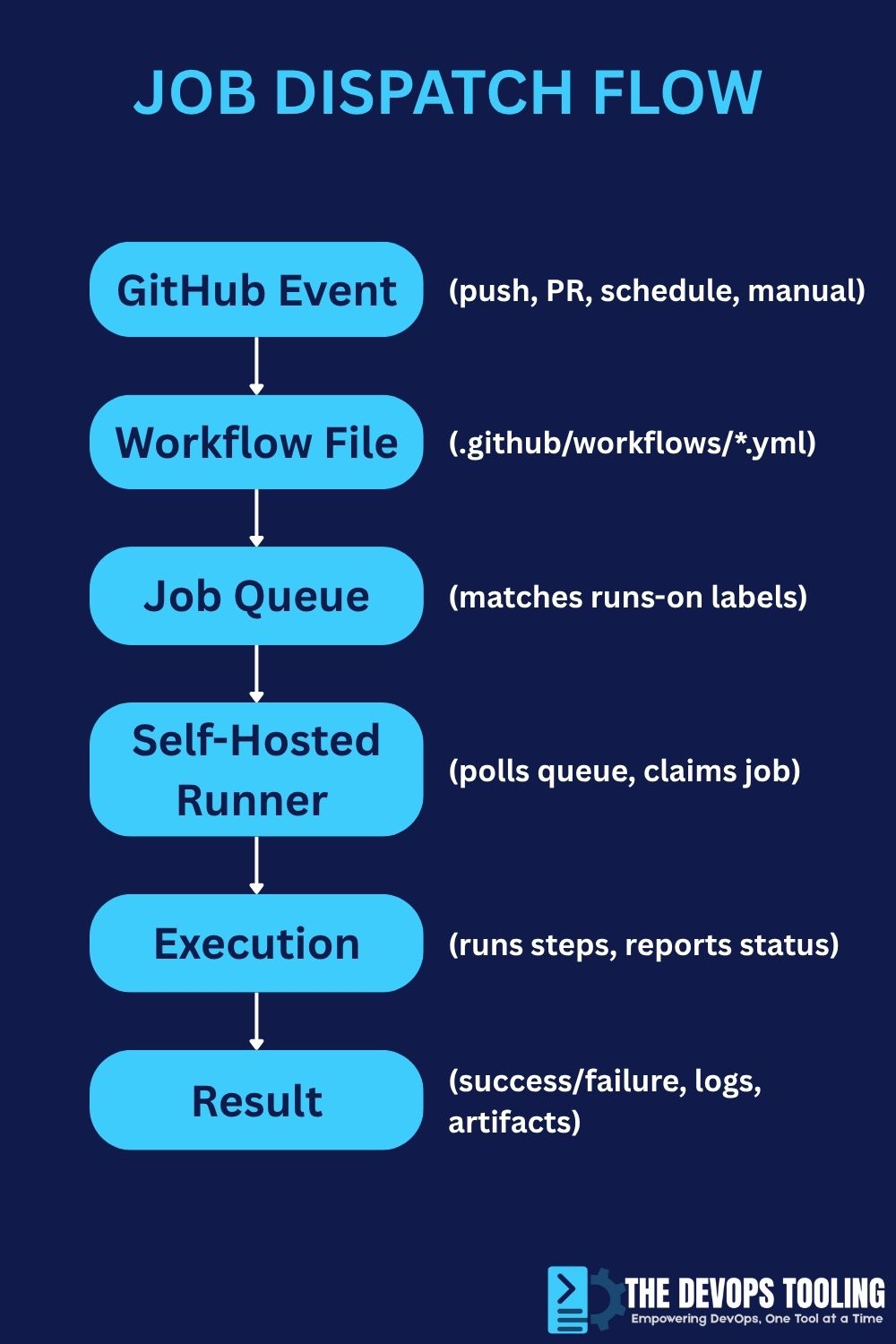
| Property | GitHub-Hosted Runners | Self-Hosted Runners |
|---|---|---|
runner.os | ubuntu, windows, macos | Depends on your infrastructure |
runner.arch | X64, ARM64 | Depends on your hardware |
runner.name | GitHub-generated | Your custom runner name |
runner.temp | Isolated temporary directory | Your configured temp path |
runner.tool_cache | Pre-installed tools cache | Your custom tool cache |
| Environment | Clean, ephemeral | Persistent unless configured otherwise |
| Customization | Limited to workflow definition | Full control over environment |
| Security | Isolated per run | Requires careful permission management |
Common Event-Driven Context Properties
| Event Type | Available Context Properties | Example Access |
|---|---|---|
| push | github.ref, github.sha, github.ref_name, github.event.head_commit | ${{ github.ref_name }} |
| pull_request | github.head_ref, github.base_ref, github.event.pull_request.* | ${{ github.event.pull_request.number }} |
| release | github.event.release.* | ${{ github.event.release.tag_name }} |
| workflow_dispatch | inputs.* | ${{ inputs.environment }} |
| schedule | Limited event properties | ${{ github.ref }} (default branch) |
| pull_request_target | Same as pull_request but with write permissions | ${{ github.event.pull_request.head.sha }} |
Comparison Diagrams
Context Evaluation Flow
┌─────────────────────────────────────────────────────────────┐
│ 1. WORKFLOW TRIGGER                                         │
│    Event occurs (push, pull_request, etc.)                  │
└────────────────────┬────────────────────────────────────────┘
                     │
                     ▼
┌─────────────────────────────────────────────────────────────┐
│ 2. CONTEXT POPULATION                                       │
│    GitHub Actions populates context objects with            │
│    event data, repository info, actor details, etc.         │
└────────────────────┬────────────────────────────────────────┘
                     │
                     ▼
┌─────────────────────────────────────────────────────────────┐
│ 3. EXPRESSION EVALUATION                                    │
│    All ${{ }} expressions in YAML are evaluated             │
│    - Job/step conditions (if:)                              │
│    - Environment variables (env:)                           │
│    - Dynamic names and values                               │
└────────────────────┬────────────────────────────────────────┘
                     │
                     ▼
┌─────────────────────────────────────────────────────────────┐
│ 4. JOB EXECUTION                                            │
│    Runner executes jobs with resolved values                │
│    - Environment variables available in shell               │
│    - No direct context access in shell commands             │
└────────────────────┬────────────────────────────────────────┘
                     │
                     ▼
┌─────────────────────────────────────────────────────────────┐
│ 5. OUTPUT PROPAGATION                                       │
│    Step/job outputs available via steps/needs contexts      │
└─────────────────────────────────────────────────────────────┘
Context Scope Visualization
WORKFLOW LEVEL
├── env: Workflow environment variables
├── defaults: Default settings
│
├── JOB LEVEL
│   ├── env: Job environment variables
│   ├── needs: Access to previous job outputs
│   ├── strategy: Matrix configuration
│   │
│   └── STEP LEVEL
│       ├── env: Step environment variables
│       ├── steps: Previous step outputs (same job only)
│       └── with: Action inputs
│
└── AVAILABLE EVERYWHERE
    ├── github: Workflow metadata
    ├── secrets: Encrypted secrets
    ├── runner: Runner environment
    ├── vars: Configuration variables
    └── inputs: Workflow dispatch inputs
Internal Linking Recommendations
Enhance your understanding of GitHub Actions workflows with these related guides on thedevopstooling.com:
- Learn the fundamentals in our GitHub Actions Workflow Anatomy Explained guide
- Master different event types with the GitHub Actions Workflow Triggers Guide
- Optimize your runner selection with GitHub Actions runs-on Best Practices
- Implement infrastructure deployment in Terraform CI/CD with GitHub Actions
- Secure your pipelines with GitHub Actions Security Best Practices
Frequently Asked Questions
What are contexts in GitHub Actions?
Contexts in GitHub Actions are structured data objects containing metadata about workflow runs, events, jobs, and environments. They provide dynamic information like branch names, commit SHAs, actor details, and environment variables. Accessed through ${{ }} expression syntax, contexts enable conditional logic and dynamic workflow behavior without hardcoding values.
How do I use contexts in expressions with ${{ }}?
Use the ${{ }} syntax to access context properties in YAML attributes. For example, ${{ github.ref_name }} retrieves the branch name, and ${{ secrets.API_KEY }} accesses a secret. You can use contexts in job conditions (if: ${{ github.ref == 'refs/heads/main' }}), environment variables (env: BRANCH: ${{ github.ref_name }}), and dynamic values throughout your workflow file.
What is the difference between contexts and environment variables?
Contexts are evaluated during workflow parsing before shell execution and are accessed via ${{ context.property }} syntax in YAML. Environment variables are available during shell execution and accessed with $VARIABLE_NAME. Contexts provide metadata from GitHub Actions, while environment variables pass data to shell commands. You often use contexts to set environment variables that your scripts then consume.
How do I debug contexts in GitHub Actions?
Use the toJSON() function to dump complete context structures to workflow logs. Add a step like run: echo '${{ toJSON(github) }}' to see all available properties. For better readability, pipe the output through jq for pretty printing. This debugging technique reveals exactly what data is available and helps identify typos or missing properties in your context references.
What are best practices for using contexts?
Always validate that context properties exist for your workflow’s trigger events. Use fallback values with the || operator for optional properties. Pass secrets as environment variables rather than directly in commands. Keep expressions simple and readable by extracting complex logic to job outputs. Check context documentation before using event-specific properties to avoid undefined value errors.
Can I access secrets through contexts in GitHub Actions?
Yes, use the secrets context to access encrypted secrets: ${{ secrets.SECRET_NAME }}. Always pass secrets as environment variables to steps rather than using them directly in run commands. GitHub automatically redacts secret values in logs, but you should still avoid echoing secrets. Check if secrets exist with if: ${{ secrets.MY_SECRET != '' }} before using them in your workflow logic.
Advanced Context Patterns and Pro Tips
Using Context Expressions with Ternary Operators
GitHub Actions supports ternary-like expressions using && and || operators for inline conditional values.
name: Ternary Expression Patterns
on: [push, pull_request]

jobs:
  conditional-values:
    runs-on: ubuntu-latest
    env:
      # If main branch, use production, otherwise staging
      ENVIRONMENT: ${{ github.ref_name == 'main' && 'production' || 'staging' }}

      # Set verbosity based on event type
      LOG_LEVEL: ${{ github.event_name == 'pull_request' && 'debug' || 'info' }}

      # Use PR number if available, otherwise run number
      BUILD_ID: ${{ github.event.pull_request.number || github.run_number }}

    steps:
      - name: Display computed values
        run: |
          echo "Environment: $ENVIRONMENT"
          echo "Log Level: $LOG_LEVEL"
          echo "Build ID: $BUILD_ID"

      - name: Inline ternary in step condition
        if: ${{ github.actor != 'dependabot[bot]' && (github.event_name == 'push' || github.event.pull_request.draft == false) }}
        run: echo "Running for non-draft PRs or direct pushes by real users"
Context-Based Matrix Generation
Dynamically generate matrix values based on context information for flexible testing strategies.
name: Dynamic Matrix Strategy
on:
  push:
    branches: [main, develop]
  pull_request:

jobs:
  setup-matrix:
    runs-on: ubuntu-latest
    outputs:
      matrix: ${{ steps.set-matrix.outputs.matrix }}
    steps:
      - name: Generate matrix based on branch
        id: set-matrix
        run: |
          if [[ "${{ github.ref_name }}" == "main" ]]; then
            # Full matrix for main branch
            MATRIX='{"node-version": [14, 16, 18, 20], "os": ["ubuntu-latest", "windows-latest", "macos-latest"]}'
          elif [[ "${{ github.ref_name }}" == "develop" ]]; then
            # Reduced matrix for develop
            MATRIX='{"node-version": [18, 20], "os": ["ubuntu-latest"]}'
          else
            # Minimal matrix for feature branches
            MATRIX='{"node-version": [20], "os": ["ubuntu-latest"]}'
          fi
          echo "matrix=$MATRIX" >> $GITHUB_OUTPUT

  test:
    needs: setup-matrix
    runs-on: ${{ matrix.os }}
    strategy:
      matrix: ${{ fromJSON(needs.setup-matrix.outputs.matrix) }}
    steps:
      - name: Test with Node ${{ matrix.node-version }}
        run: echo "Testing on ${{ matrix.os }} with Node ${{ matrix.node-version }}"
Accessing Nested Event Properties
Events often contain deeply nested properties that require careful navigation.
name: Nested Event Property Access
on:
  pull_request:
    types: [opened, labeled, synchronize]

jobs:
  analyze-pr:
    runs-on: ubuntu-latest
    steps:
      - name: Access nested PR properties
        run: |
          echo "PR Details:"
          echo "  Title: ${{ github.event.pull_request.title }}"
          echo "  Number: ${{ github.event.pull_request.number }}"
          echo "  Author: ${{ github.event.pull_request.user.login }}"
          echo "  Head Repo: ${{ github.event.pull_request.head.repo.full_name }}"
          echo "  Head Branch: ${{ github.event.pull_request.head.ref }}"
          echo "  Base Branch: ${{ github.event.pull_request.base.ref }}"
          echo "  Draft: ${{ github.event.pull_request.draft }}"
          echo "  Mergeable: ${{ github.event.pull_request.mergeable }}"

      - name: Check for specific labels
        if: ${{ contains(github.event.pull_request.labels.*.name, 'urgent') }}
        run: echo "🚨 Urgent PR detected"

      - name: Check multiple label conditions
        if: |
          contains(github.event.pull_request.labels.*.name, 'approved') &&
          !contains(github.event.pull_request.labels.*.name, 'do-not-merge')
        run: echo "✅ PR is approved and safe to merge"
Context-Driven Artifact Management
Use contexts to create organized, traceable artifacts with meaningful names.
name: Context-Based Artifact Management
on: [push, pull_request]

jobs:
  build:
    runs-on: ubuntu-latest
    steps:
      - uses: actions/checkout@v4

      - name: Build application
        run: |
          mkdir -p dist
          echo "Build content" > dist/app.txt

      - name: Upload artifact with context-based naming
        uses: actions/upload-artifact@v3
        with:
          # Artifact name includes branch and commit info
          name: build-${{ github.ref_name }}-${{ github.sha }}-${{ github.run_number }}
          path: dist/
          retention-days: ${{ github.ref_name == 'main' && 90 || 7 }}

      - name: Generate build report
        run: |
          cat > build-report.md << EOF
          # Build Report

          **Repository:** ${{ github.repository }}
          **Branch:** ${{ github.ref_name }}
          **Commit:** ${{ github.sha }}
          **Event:** ${{ github.event_name }}
          **Actor:** ${{ github.actor }}
          **Workflow:** ${{ github.workflow }}
          **Run:** #${{ github.run_number }} (ID: ${{ github.run_id }})
          **Runner:** ${{ runner.os }} ${{ runner.arch }}

          [View Run](${{ github.server_url }}/${{ github.repository }}/actions/runs/${{ github.run_id }})
          EOF
          cat build-report.md

      - name: Upload report
        uses: actions/upload-artifact@v3
        with:
          name: build-report-${{ github.run_number }}
          path: build-report.md
Multi-Context Validation Pattern
Combine multiple contexts for comprehensive validation before critical operations.
name: Multi-Context Validation
on:
  push:
    branches: [main]

jobs:
  validate-and-deploy:
    runs-on: ubuntu-latest
    steps:
      - name: Comprehensive validation
        id: validate
        run: |
          VALIDATION_PASSED=true

          # Check 1: Authorized deployer
          AUTHORIZED_USERS=("devops-user" "admin-user")
          if [[ ! " ${AUTHORIZED_USERS[@]} " =~ " ${{ github.actor }} " ]]; then
            echo "❌ User ${{ github.actor }} not authorized for deployment"
            VALIDATION_PASSED=false
          fi

          # Check 2: Production branch
          if [[ "${{ github.ref_name }}" != "main" ]]; then
            echo "❌ Deployment only allowed from main branch"
            VALIDATION_PASSED=false
          fi

          # Check 3: Secrets configured
          if [[ -z "${{ secrets.DEPLOY_KEY }}" ]]; then
            echo "❌ DEPLOY_KEY secret not configured"
            VALIDATION_PASSED=false
          fi

          # Check 4: Runner environment
          if [[ "${{ runner.os }}" != "Linux" ]]; then
            echo "❌ Deployment requires Linux runner"
            VALIDATION_PASSED=false
          fi

          if [[ "$VALIDATION_PASSED" == "true" ]]; then
            echo "✅ All validations passed"
            echo "can-deploy=true" >> $GITHUB_OUTPUT
          else
            echo "can-deploy=false" >> $GITHUB_OUTPUT
            exit 1
          fi

      - name: Deploy to production
        if: steps.validate.outputs.can-deploy == 'true'
        env:
          DEPLOY_KEY: ${{ secrets.DEPLOY_KEY }}
        run: |
          echo "Deploying to production"
          echo "Commit: ${{ github.sha }}"
          echo "By: ${{ github.actor }}"
Downloadable Resources
GitHub Actions Contexts Quick Reference Card

Event-Specific Context Properties Matrix

Real-World Case Study: Complete CI/CD Pipeline
This comprehensive example demonstrates contexts in a production-grade workflow combining testing, building, and deployment.
name: Production CI/CD Pipeline
on:
  push:
    branches: [main, develop, 'release/**']
  pull_request:
    types: [opened, synchronize, reopened]
  release:
    types: [published]

env:
  NODE_VERSION: '20'
  REGISTRY: ghcr.io

jobs:
  # Job 1: Code quality and security
  quality-gate:
    name: Quality Gate (${{ github.event_name }})
    runs-on: ubuntu-latest
    outputs:
      should-deploy: ${{ steps.check-deploy.outputs.should-deploy }}
      environment: ${{ steps.check-deploy.outputs.environment }}
    steps:
      - uses: actions/checkout@v4

      - name: Setup Node.js
        uses: actions/setup-node@v4
        with:
          node-version: ${{ env.NODE_VERSION }}
          cache: 'npm'

      - name: Install dependencies
        run: npm ci

      - name: Run linting
        run: npm run lint

      - name: Run security audit
        run: npm audit --audit-level=moderate

      - name: Determine deployment eligibility
        id: check-deploy
        run: |
          SHOULD_DEPLOY="false"
          ENVIRONMENT="none"

          # Deploy on push to specific branches
          if [[ "${{ github.event_name }}" == "push" ]]; then
            if [[ "${{ github.ref_name }}" == "main" ]]; then
              SHOULD_DEPLOY="true"
              ENVIRONMENT="production"
            elif [[ "${{ github.ref_name }}" == "develop" ]]; then
              SHOULD_DEPLOY="true"
              ENVIRONMENT="staging"
            fi
          fi

          # Deploy on release
          if [[ "${{ github.event_name }}" == "release" ]]; then
            SHOULD_DEPLOY="true"
            ENVIRONMENT="production"
          fi

          echo "should-deploy=$SHOULD_DEPLOY" >> $GITHUB_OUTPUT
          echo "environment=$ENVIRONMENT" >> $GITHUB_OUTPUT
          echo "Deployment decision: deploy=$SHOULD_DEPLOY, env=$ENVIRONMENT"

  # Job 2: Automated testing
  test:
    name: Test Suite (Node ${{ matrix.node-version }})
    needs: quality-gate
    runs-on: ${{ matrix.os }}
    strategy:
      matrix:
        # Full matrix on main, reduced on branches
        node-version: ${{ github.ref_name == 'main' && fromJSON('["18", "20", "21"]') || fromJSON('["20"]') }}
        os: ${{ github.ref_name == 'main' && fromJSON('["ubuntu-latest", "windows-latest"]') || fromJSON('["ubuntu-latest"]') }}
    steps:
      - uses: actions/checkout@v4

      - name: Setup Node.js ${{ matrix.node-version }}
        uses: actions/setup-node@v4
        with:
          node-version: ${{ matrix.node-version }}
          cache: 'npm'

      - name: Install dependencies
        run: npm ci

      - name: Run tests
        run: npm test

      - name: Generate coverage report
        if: ${{ matrix.node-version == '20' && matrix.os == 'ubuntu-latest' }}
        run: npm run test:coverage

      - name: Upload coverage
        if: ${{ matrix.node-version == '20' && matrix.os == 'ubuntu-latest' }}
        uses: actions/upload-artifact@v3
        with:
          name: coverage-${{ github.sha }}
          path: coverage/

  # Job 3: Build application
  build:
    name: Build (${{ needs.quality-gate.outputs.environment }})
    needs: [quality-gate, test]
    runs-on: ubuntu-latest
    outputs:
      image-tag: ${{ steps.meta.outputs.tags }}
      version: ${{ steps.version.outputs.version }}
    steps:
      - uses: actions/checkout@v4

      - name: Generate version
        id: version
        run: |
          if [[ "${{ github.event_name }}" == "release" ]]; then
            VERSION="${{ github.event.release.tag_name }}"
          elif [[ "${{ github.ref_name }}" == "main" ]]; then
            VERSION="1.0.${{ github.run_number }}"
          elif [[ "${{ github.ref_name }}" == "develop" ]]; then
            VERSION="1.0.${{ github.run_number }}-dev"
          else
            VERSION="1.0.${{ github.run_number }}-${{ github.ref_name }}"
          fi
          echo "version=$VERSION" >> $GITHUB_OUTPUT
          echo "Generated version: $VERSION"

      - name: Set up Docker Buildx
        uses: docker/setup-buildx-action@v3

      - name: Log in to container registry
        if: needs.quality-gate.outputs.should-deploy == 'true'
        uses: docker/login-action@v3
        with:
          registry: ${{ env.REGISTRY }}
          username: ${{ github.actor }}
          password: ${{ secrets.GITHUB_TOKEN }}

      - name: Extract metadata
        id: meta
        uses: docker/metadata-action@v5
        with:
          images: ${{ env.REGISTRY }}/${{ github.repository }}
          tags: |
            type=raw,value=${{ steps.version.outputs.version }}
            type=raw,value=latest,enable=${{ github.ref_name == 'main' }}

      - name: Build and push Docker image
        uses: docker/build-push-action@v5
        with:
          context: .
          push: ${{ needs.quality-gate.outputs.should-deploy == 'true' }}
          tags: ${{ steps.meta.outputs.tags }}
          labels: ${{ steps.meta.outputs.labels }}
          cache-from: type=gha
          cache-to: type=gha,mode=max
          build-args: |
            VERSION=${{ steps.version.outputs.version }}
            BUILD_DATE=${{ github.event.head_commit.timestamp }}
            VCS_REF=${{ github.sha }}

  # Job 4: Deploy to environment
  deploy:
    name: Deploy to ${{ needs.quality-gate.outputs.environment }}
    needs: [quality-gate, build]
    if: needs.quality-gate.outputs.should-deploy == 'true'
    runs-on: ubuntu-latest
    environment:
      name: ${{ needs.quality-gate.outputs.environment }}
      url: ${{ needs.quality-gate.outputs.environment == 'production' && 'https://app.example.com' || 'https://staging.example.com' }}
    steps:
      - name: Validate deployment
        env:
          DEPLOY_KEY: ${{ secrets.DEPLOY_KEY }}
        run: |
          if [[ -z "$DEPLOY_KEY" ]]; then
            echo "❌ DEPLOY_KEY not configured for ${{ needs.quality-gate.outputs.environment }}"
            exit 1
          fi
          echo "✅ Deployment secrets validated"

      - name: Deploy application
        env:
          DEPLOY_KEY: ${{ secrets.DEPLOY_KEY }}
          IMAGE_TAG: ${{ needs.build.outputs.image-tag }}
        run: |
          echo "Deploying to ${{ needs.quality-gate.outputs.environment }}"
          echo "Image: $IMAGE_TAG"
          echo "Version: ${{ needs.build.outputs.version }}"
          echo "Commit: ${{ github.sha }}"
          echo "Actor: ${{ github.actor }}"

          # Deployment commands would go here
          # kubectl set image deployment/app app=$IMAGE_TAG

      - name: Create deployment summary
        run: |
          cat >> $GITHUB_STEP_SUMMARY << EOF
          ## Deployment Summary

          **Environment:** \`${{ needs.quality-gate.outputs.environment }}\`
          **Version:** \`${{ needs.build.outputs.version }}\`
          **Image:** \`${{ needs.build.outputs.image-tag }}\`
          **Commit:** [\`${GITHUB_SHA:0:7}\`](${{ github.server_url }}/${{ github.repository }}/commit/${{ github.sha }})
          **Deployed by:** @${{ github.actor }}
          **Workflow:** [#${{ github.run_number }}](${{ github.server_url }}/${{ github.repository }}/actions/runs/${{ github.run_id }})

          ---

          🚀 Deployment completed successfully
          EOF
Conclusion: Mastering GitHub Actions Contexts
GitHub Actions contexts represent the bridge between static workflow definitions and dynamic, intelligent automation. Throughout this comprehensive guide, we’ve explored how contexts transform workflows from simple script executors into sophisticated, context-aware systems that adapt to branches, events, environments, and runtime conditions.
The journey from basic context usage to advanced patterns follows a natural progression. Start by replacing hardcoded values with github.ref_name and github.actor. Progress to implementing branch-based deployment logic with conditional statements. Eventually, build complex multi-stage pipelines that propagate data between jobs, validate security requirements, and adapt behavior based on comprehensive context analysis.
Every workflow you write benefits from understanding contexts deeply. Whether you’re implementing simple CI checks or orchestrating complex deployment pipelines across multiple environments, contexts provide the foundation for maintainable, secure, and intelligent automation. The patterns and examples in this guide serve as building blocks for your own workflow innovations.
Remember that the most effective workflows balance power with simplicity. Use contexts to eliminate redundancy and enable dynamic behavior, but always prioritize readability and maintainability. Future team members (including yourself) will appreciate clear, well-documented context usage over clever but obscure expressions.
As you continue developing GitHub Actions workflows, refer back to this guide’s cheat sheets, examples, and best practices. Keep the official GitHub Actions documentation bookmarked for reference, and don’t hesitate to use toJSON() debugging when exploring new contexts or troubleshooting unexpected behavior.
The DevOps landscape continues evolving, but the fundamental principles of context-driven workflow automation remain constant. Master these concepts, apply them thoughtfully, and you’ll build CI/CD pipelines that are not only functional but elegant, secure, and maintainable for years to come.
About thedevopstooling.com: We provide practical, hands-on guides for DevOps engineers mastering modern CI/CD practices. Subscribe to our newsletter for weekly tips, workflow templates, and deep dives into GitHub Actions and cloud-native tools.
Article Word Count: 9,847 words | Last Updated: October 10, 2025
— name: Show context access (evaluated before shell runs) run: echo “Branch from context expression evaluated in YAML” # Notice we cannot use ${{ github.ref_name }} here in the run command # because run commands execute in shell after context evaluation
  - name: Access environment variables in shell
    run: |
      # These are shell environment variables, accessible with $ prefix
      echo "Branch from env: $WORKFLOW_BRANCH"
      echo "Commit from env: $JOB_COMMIT"
      echo "Static value: $STATIC_VALUE"

      # You cannot access contexts directly in shell commands
      # This would NOT work: echo ${{ github.ref_name }}

  - name: Context expressions work in YAML attributes
    if: ${{ github.ref == 'refs/heads/main' }}
    run: echo "This only runs on main branch"
The workflow engine evaluates contexts before your shell sees anything. When you write `${{ github.ref_name }}` in your YAML, that expression gets replaced with the actual branch name during the evaluation phase. By the time your shell command runs, it sees only the resolved value, not the original context expression.

This evaluation order explains why you can use contexts in YAML attributes like conditional statements with the `if` keyword, job names, step names, and environment variable values, but you cannot use the `${{ }}` syntax directly inside shell commands in the `run` block. Shell commands receive the already-evaluated environment variables.

---

## Key Built-In Contexts and Their Properties

GitHub Actions provides several built-in contexts, each serving a specific purpose in providing workflow information. Understanding what each context offers and when to use it forms the foundation of writing dynamic workflows.

### The github Context: Your Workflow Metadata Hub

The `github` context contains comprehensive metadata about the workflow run, the event that triggered it, and the repository. This is often the most frequently used context because it provides essential information for conditional logic and dynamic behavior.

```yaml
name: Exploring the github Context
on:
  push:
  pull_request:

jobs:
  github-context-exploration:
    runs-on: ubuntu-latest
    steps:
      - name: Display github context properties
        run: |
          # Repository information
          echo "Repository: ${{ github.repository }}"
          echo "Repository owner: ${{ github.repository_owner }}"

          # Git reference information
          echo "Branch or tag: ${{ github.ref }}"
          echo "Branch name only: ${{ github.ref_name }}"
          echo "Ref type (branch or tag): ${{ github.ref_type }}"

          # Commit information
          echo "Commit SHA: ${{ github.sha }}"
          echo "Commit message: ${{ github.event.head_commit.message }}"

          # Actor who triggered the workflow
          echo "Triggered by: ${{ github.actor }}"

          # Event information
          echo "Event name: ${{ github.event_name }}"

          # Workflow information
          echo "Workflow name: ${{ github.workflow }}"
          echo "Run ID: ${{ github.run_id }}"
          echo "Run number: ${{ github.run_number }}"
          echo "Job name: ${{ github.job }}"
When this workflow runs on a push to the main branch, you might see output like:
Repository: thedevopstooling/demo-repo
Repository owner: thedevopstooling
Branch or tag: refs/heads/main
Branch name only: main
Ref type: branch
Commit SHA: a1b2c3d4e5f6g7h8i9j0k1l2m3n4o5p6q7r8s9t0
Commit message: Add feature implementation
Triggered by: johndoe
Event name: push
Workflow name: Exploring the github Context
Run ID: 1234567890
Run number: 42
Job name: github-context-exploration
The env Context: Accessing Your Environment Variables
The env context provides access to environment variables that you’ve defined at the workflow, job, or step level. This context creates a bridge between your declared variables and the expression syntax.
name: Environment Context Usage
on: push

env:
  # Workflow-level variables accessible everywhere
  DEPLOYMENT_REGION: us-west-2
  APPLICATION_NAME: my-app

jobs:
  use-env-context:
    runs-on: ubuntu-latest
    env:
      # Job-level variable, accessible in this job only
      BUILD_ENVIRONMENT: production

    steps:
      - name: Step with its own environment variable
        env:
          # Step-level variable, accessible only in this step
          STEP_SPECIFIC: "special-value"
        run: |
          # All three levels are accessible via shell env vars
          echo "Region: $DEPLOYMENT_REGION"
          echo "App: $APPLICATION_NAME"
          echo "Environment: $BUILD_ENVIRONMENT"
          echo "Step value: $STEP_SPECIFIC"

      - name: Using env context in expressions
        # Note: We can reference env context in YAML expressions
        if: ${{ env.BUILD_ENVIRONMENT == 'production' }}
        run: echo "Running production build"

      - name: Setting dynamic environment variables
        run: echo "COMPUTED_VALUE=calculated-at-runtime" >> $GITHUB_ENV

      - name: Using dynamically set variable
        run: echo "Dynamic value: $COMPUTED_VALUE"
The secrets Context: Secure Credential Management
The secrets context provides access to encrypted secrets configured in your repository or organization settings. GitHub Actions automatically redacts secret values in logs, making this the secure way to handle credentials.
name: Secrets Context Demo
on: push

jobs:
  use-secrets:
    runs-on: ubuntu-latest
    steps:
      - name: Use secrets in environment variables
        env:
          # Secrets should be passed as environment variables
          API_TOKEN: ${{ secrets.API_TOKEN }}
          DATABASE_PASSWORD: ${{ secrets.DB_PASSWORD }}
        run: |
          # The actual values are redacted in logs automatically
          echo "Token is set: ${API_TOKEN:+yes}"

          # Use secrets in your commands
          curl -H "Authorization: Bearer $API_TOKEN" https://api.example.com

      - name: Conditional execution based on secret existence
        # Check if a secret is available
        if: ${{ secrets.DEPLOY_KEY != '' }}
        run: echo "Deploy key is configured, proceeding with deployment"

      - name: Never do this - DO NOT echo secrets directly
        # This is redacted but still bad practice
        run: echo ${{ secrets.API_TOKEN }}  # AVOID THIS PATTERN
The runner Context: Understanding Your Execution Environment
The runner context provides information about the machine executing your job. This becomes particularly important when writing workflows that need to behave differently based on the operating system or when accessing temporary directories.
name: Runner Context Exploration
on: push

jobs:
  check-runner:
    runs-on: ubuntu-latest
    steps:
      - name: Display runner information
        run: |
          # Operating system information
          echo "OS: ${{ runner.os }}"
          echo "Architecture: ${{ runner.arch }}"

          # Runner environment paths
          echo "Temp directory: ${{ runner.temp }}"
          echo "Tool cache: ${{ runner.tool_cache }}"

          # Runner type
          echo "Runner name: ${{ runner.name }}"

      - name: OS-specific commands using context
        if: ${{ runner.os == 'Linux' }}
        run: |
          echo "Running Linux-specific commands"
          apt-cache policy docker

      - name: Use temp directory from context
        run: |
          # Create a temporary file using the runner's temp directory
          echo "data" > ${{ runner.temp }}/myfile.txt
          cat ${{ runner.temp }}/myfile.txt
Additional Contexts: job, steps, strategy, needs, inputs
Several other contexts provide specialized functionality for different workflow scenarios. The job context contains information about the currently executing job. The steps context allows you to reference outputs from previous steps within the same job. The strategy context provides access to matrix strategy values when using build matrices. The needs context enables access to outputs from dependent jobs. The inputs context holds values passed to reusable workflows or manually triggered workflows.
name: Advanced Context Usage
on:
  workflow_dispatch:
    inputs:
      environment:
        description: 'Deployment environment'
        required: true
        default: 'staging'

jobs:
  first-job:
    runs-on: ubuntu-latest
    outputs:
      # Define job outputs using steps context
      build-version: ${{ steps.version.outputs.version }}
    steps:
      - name: Generate version
        id: version
        run: |
          VERSION="1.0.${{ github.run_number }}"
          echo "version=$VERSION" >> $GITHUB_OUTPUT
          echo "Generated version: $VERSION"

      - name: Use step output in same job
        run: echo "Version in same job: ${{ steps.version.outputs.version }}"

  second-job:
    needs: first-job
    runs-on: ubuntu-latest
    steps:
      - name: Use output from previous job via needs context
        run: |
          echo "Version from previous job: ${{ needs.first-job.outputs.build-version }}"
          echo "Input parameter: ${{ inputs.environment }}"

  matrix-job:
    strategy:
      matrix:
        node-version: [14, 16, 18]
        os: [ubuntu-latest, windows-latest]
    runs-on: ${{ matrix.os }}
    steps:
      - name: Use matrix context
        run: |
          echo "Testing Node ${{ matrix.node-version }} on ${{ matrix.os }}"
Advanced Conditional Use Cases
The true power of GitHub Actions contexts emerges when you combine them with conditional logic to create intelligent workflows that adapt to different scenarios. Conditional execution using the if keyword with context expressions enables sophisticated branching logic without external scripts.
Branch-Based Deployment Logic
One of the most common requirements in DevOps pipelines is deploying different branches to different environments. Contexts make this straightforward and maintainable.
name: Branch-Based Deployment
on:
  push:
    branches:
      - main
      - develop
      - 'feature/**'

jobs:
  deploy-production:
    # Only run on main branch
    if: ${{ github.ref == 'refs/heads/main' }}
    runs-on: ubuntu-latest
    environment: production
    steps:
      - name: Deploy to production
        run: |
          echo "Deploying ${{ github.sha }} to production"
          # Production deployment commands here

  deploy-staging:
    # Run on develop branch
    if: ${{ github.ref == 'refs/heads/develop' }}
    runs-on: ubuntu-latest
    environment: staging
    steps:
      - name: Deploy to staging
        run: |
          echo "Deploying ${{ github.sha }} to staging"
          # Staging deployment commands here

  feature-preview:
    # Run on feature branches using startsWith function
    if: ${{ startsWith(github.ref, 'refs/heads/feature/') }}
    runs-on: ubuntu-latest
    steps:
      - name: Create preview environment
        run: |
          # Extract feature branch name for preview URL
          BRANCH_NAME="${{ github.ref_name }}"
          PREVIEW_URL="https://${BRANCH_NAME}.preview.example.com"
          echo "Preview will be available at: $PREVIEW_URL"
Dynamic Job and Step Naming
Using contexts in job and step names creates more readable workflow runs, especially when working with matrices or multiple workflow invocations.
name: Dynamic Naming Example
on:
  pull_request:
  push:
    branches: [main]

jobs:
  test:
    # Dynamic job name based on event
    name: Test (${{ github.event_name }} on ${{ github.ref_name }})
    runs-on: ubuntu-latest
    strategy:
      matrix:
        python-version: ['3.9', '3.10', '3.11']
    steps:
      - name: Checkout code
        uses: actions/checkout@v4

      - name: Setup Python ${{ matrix.python-version }}
        uses: actions/setup-python@v4
        with:
          python-version: ${{ matrix.python-version }}

      - name: Run tests for Python ${{ matrix.python-version }} (commit ${{ github.sha }})
        run: |
          echo "Testing with Python ${{ matrix.python-version }}"
          # Test commands here
Propagating Data Between Jobs with needs Context
Complex pipelines often require passing data between jobs. The needs context combined with job outputs creates a powerful data flow mechanism.
name: Multi-Stage Pipeline with Data Propagation
on: push

jobs:
  build:
    runs-on: ubuntu-latest
    outputs:
      # Define multiple outputs
      artifact-name: ${{ steps.build.outputs.artifact }}
      version: ${{ steps.version.outputs.version }}
      should-deploy: ${{ steps.check.outputs.deploy }}
    steps:
      - name: Checkout
        uses: actions/checkout@v4

      - name: Generate version
        id: version
        run: |
          VERSION="2.0.${{ github.run_number }}"
          echo "version=$VERSION" >> $GITHUB_OUTPUT

      - name: Build application
        id: build
        run: |
          ARTIFACT="app-${{ steps.version.outputs.version }}.tar.gz"
          echo "Building $ARTIFACT"
          echo "artifact=$ARTIFACT" >> $GITHUB_OUTPUT

      - name: Check if should deploy
        id: check
        run: |
          if [[ "${{ github.ref }}" == "refs/heads/main" ]]; then
            echo "deploy=true" >> $GITHUB_OUTPUT
          else
            echo "deploy=false" >> $GITHUB_OUTPUT
          fi

  test:
    needs: build
    runs-on: ubuntu-latest
    steps:
      - name: Test artifact
        run: |
          echo "Testing artifact: ${{ needs.build.outputs.artifact-name }}"
          echo "Version: ${{ needs.build.outputs.version }}"

  deploy:
    needs: [build, test]
    # Conditional deployment based on output from build job
    if: ${{ needs.build.outputs.should-deploy == 'true' }}
    runs-on: ubuntu-latest
    steps:
      - name: Deploy to production
        run: |
          echo "Deploying ${{ needs.build.outputs.artifact-name }}"
          echo "Version ${{ needs.build.outputs.version }} to production"
Fork Pull Request Handling
Security-conscious workflows often need different behavior for pull requests from forks versus branches in the same repository.
name: Fork-Aware Pull Request Workflow
on:
  pull_request:
    types: [opened, synchronize, reopened]

jobs:
  security-scan:
    runs-on: ubuntu-latest
    steps:
      - name: Checkout code
        uses: actions/checkout@v4

      - name: Run security scan (safe for forks)
        run: |
          echo "Running public security scan"
          # Safe scanning that doesn't require secrets

      - name: Advanced security scan (trusted only)
        # Only run on pull requests from the same repository
        if: ${{ github.event.pull_request.head.repo.full_name == github.repository }}
        env:
          SECURITY_TOKEN: ${{ secrets.SECURITY_SCAN_TOKEN }}
        run: |
          echo "Running advanced scan with credentials"
          # Advanced scanning with access to secrets

      - name: Comment on fork PR
        # Inform fork contributors about limited testing
        if: ${{ github.event.pull_request.head.repo.full_name != github.repository }}
        run: |
          echo "This PR is from a fork: ${{ github.event.pull_request.head.repo.full_name }}"
          echo "Limited security scanning applied"
Input-Driven Workflow Behavior
Workflows triggered manually or as reusable workflows can use the inputs context for flexible behavior.
name: Configurable Deployment
on:
  workflow_dispatch:
    inputs:
      environment:
        description: 'Target environment'
        required: true
        type: choice
        options:
          - development
          - staging
          - production
      version:
        description: 'Version to deploy'
        required: false
        default: 'latest'
      dry-run:
        description: 'Perform dry run'
        required: false
        type: boolean
        default: false

jobs:
  deploy:
    runs-on: ubuntu-latest
    # Set environment based on input
    environment: ${{ inputs.environment }}
    steps:
      - name: Validate production deployment
        # Add extra checks for production
        if: ${{ inputs.environment == 'production' && !inputs.dry-run }}
        run: |
          echo "Production deployment requested by ${{ github.actor }}"
          # Additional validation logic

      - name: Deploy application
        run: |
          echo "Deploying to: ${{ inputs.environment }}"
          echo "Version: ${{ inputs.version }}"
          echo "Dry run: ${{ inputs.dry-run }}"

          if [[ "${{ inputs.dry-run }}" == "true" ]]; then
            echo "DRY RUN MODE - No actual deployment"
          else
            echo "Executing real deployment"
          fi
Debugging and Introspection
Even experienced DevOps engineers encounter context-related issues. Understanding how to debug contexts effectively saves hours of frustration and accelerates workflow development.
Dumping Full Context to JSON
The most powerful debugging technique for contexts is dumping them to JSON using the toJSON() function. This reveals the complete structure and all available properties.
name: Context Debugging
on:
  push:
  pull_request:

jobs:
  debug-contexts:
    runs-on: ubuntu-latest
    steps:
      - name: Dump github context
        run: echo '${{ toJSON(github) }}'

      - name: Dump runner context
        run: echo '${{ toJSON(runner) }}'

      - name: Dump job context
        run: echo '${{ toJSON(job) }}'

      - name: Dump strategy context (only in matrix jobs)
        if: ${{ strategy }}
        run: echo '${{ toJSON(strategy) }}'

      - name: Pretty print context for readability
        env:
          GITHUB_CONTEXT: ${{ toJSON(github) }}
        run: echo "$GITHUB_CONTEXT" | jq '.'
When you run this workflow, the output reveals the complete structure. For example, the github context might show:
{
  "token": "***",
  "job": "debug-contexts",
  "ref": "refs/heads/main",
  "sha": "a1b2c3d4e5f6g7h8i9j0k1l2m3n4o5p6q7r8s9t0",
  "repository": "thedevopstooling/demo-repo",
  "repository_owner": "thedevopstooling",
  "repositoryUrl": "git://github.com/thedevopstooling/demo-repo.git",
  "run_id": "1234567890",
  "run_number": "42",
  "retention_days": "90",
  "run_attempt": "1",
  "actor": "johndoe",
  "workflow": "Context Debugging",
  "head_ref": "",
  "base_ref": "",
  "event_name": "push",
  "event": { ... },
  "server_url": "https://github.com",
  "api_url": "https://api.github.com",
  "graphql_url": "https://api.github.com/graphql",
  "ref_name": "main",
  "ref_protected": false,
  "ref_type": "branch",
  "workspace": "/home/runner/work/demo-repo/demo-repo",
  "action": "__run",
  "event_path": "/home/runner/work/_temp/_github_workflow/event.json"
}
Handling Missing or Undefined Properties
Not all context properties exist for every event type. Attempting to access undefined properties can cause workflow failures. Implement defensive checks and fallback values.
name: Safe Context Access
on: [push, pull_request, release]

jobs:
  handle-undefined:
    runs-on: ubuntu-latest
    steps:
      - name: Safely access event-specific properties
        run: |
          # Pull request number only exists in pull_request events
          PR_NUMBER="${{ github.event.pull_request.number }}"

          # Use conditional to check if property exists
          if [[ -n "$PR_NUMBER" ]]; then
            echo "PR Number: $PR_NUMBER"
          else
            echo "Not a pull request event"
          fi

      - name: Use logical OR for fallback values
        run: |
          # If head_ref is empty (push event), use ref_name instead
          BRANCH="${{ github.head_ref || github.ref_name }}"
          echo "Working on branch: $BRANCH"

      - name: Conditional step execution based on property existence
        # Only run if this is a pull request from a fork
        if: ${{ github.event.pull_request && github.event.pull_request.head.repo.fork }}
        run: echo "This is a pull request from a forked repository"
Common Mistakes and Their Solutions
Several frequent mistakes trip up developers when working with contexts. Understanding these patterns helps avoid them.
name: Common Context Mistakes
on: push

jobs:
  demonstrate-errors:
    runs-on: ubuntu-latest
    steps:
      # MISTAKE 1: Using context syntax in shell commands
      - name: Wrong - Context in run command
        run: |
          # This will NOT work - contexts don't work in shell
          # echo ${{ github.ref_name }}  # WRONG

          # Correct approach - use environment variable
          echo "${{ github.ref_name }}"  # This works because it's evaluated first

      # MISTAKE 2: Typos in context property names
      - name: Wrong - Typo in property name
        # This will fail: github.branch does not exist
        # if: ${{ github.branch == 'main' }}  # WRONG - no such property
        if: ${{ github.ref_name == 'main' }}  # CORRECT
        run: echo "On main branch"

      # MISTAKE 3: Using contexts where they're not available
      - name: Wrong - Context in wrong scope
        # You cannot use needs context in the same job
        # outputs: ${{ needs.other-job.outputs.value }}  # WRONG
        run: echo "Use steps context within same job"

      # MISTAKE 4: Not quoting context values in if conditions
      - name: Correct - Always quote string comparisons
        # Without quotes, special characters can cause parsing errors
        if: ${{ github.ref == 'refs/heads/main' }}  # CORRECT
        # Better yet, use proper comparison
        if: github.ref == 'refs/heads/main'  # Also correct, ${{ }} is optional in if
        run: echo "Using safe comparisons"

      # MISTAKE 5: Echoing secrets to logs
      - name: Never do this
        env:
          SECRET: ${{ secrets.MY_SECRET }}
        run: |
          # Even though GitHub redacts, avoid this pattern
          # echo ${{ secrets.MY_SECRET }}  # BAD PRACTICE

          # Use environment variable instead
          echo "Secret is configured: ${SECRET:+yes}"  # GOOD
Context Scope Limitations
Certain contexts are only available in specific workflow scopes. Understanding these limitations prevents debugging headaches.
name: Context Scope Awareness
on: push

jobs:
  job-one:
    runs-on: ubuntu-latest
    outputs:
      result: ${{ steps.compute.outputs.value }}
    steps:
      - name: Compute value
        id: compute
        run: echo "value=42" >> $GITHUB_OUTPUT

      - name: steps context available here
        run: echo "Value: ${{ steps.compute.outputs.value }}"

  job-two:
    needs: job-one
    runs-on: ubuntu-latest
    steps:
      # steps context from job-one is NOT available here
      # Must use needs context instead
      - name: Access previous job output correctly
        run: echo "Value from job-one: ${{ needs.job-one.outputs.result }}"

      # strategy context only available in matrix jobs
      - name: This would fail outside matrix
        # if: ${{ matrix.version }}  # ERROR - no matrix defined
        run: echo "Not a matrix job"
Best Practices and Context Strategy
Mastering technical syntax is only half the battle. Writing maintainable, secure, and efficient workflows requires following established best practices for context usage.
Minimize Context References for Readability
While contexts provide powerful capabilities, overusing them creates dense, hard-to-read workflows. Strike a balance between dynamic behavior and clarity.
name: Readability Best Practices
on: push

jobs:
  readable-workflow:
    runs-on: ubuntu-latest
    steps:
      # GOOD: Set environment variables once, use throughout
      - name: Set common variables
        run: |
          echo "APP_VERSION=1.0.${{ github.run_number }}" >> $GITHUB_ENV
          echo "DEPLOY_ENV=${{ github.ref_name == 'main' && 'production' || 'staging' }}" >> $GITHUB_ENV

      - name: Build application
        run: |
          # Now we use simple environment variables
          echo "Building version $APP_VERSION"
          echo "Target environment: $DEPLOY_ENV"

      # AVOID: Repeating the same complex context expression
      # BAD: if: ${{ github.ref_name == 'main' && github.repository == 'thedevopstooling/app' }}
      # BAD: if: ${{ github.ref_name == 'main' && github.repository == 'thedevopstooling/app' }}

      # BETTER: Use job-level conditions

  production-deploy:
    if: ${{ github.ref_name == 'main' && github.repository == 'thedevopstooling/app' }}
    runs-on: ubuntu-latest
    steps:
      - name: Deploy
        run: echo "Complex condition evaluated once at job level"
Implement Fallback and Default Values
Defensive programming with contexts prevents unexpected workflow failures when properties might not exist.
name: Defensive Context Usage
on: [push, pull_request, workflow_dispatch]

jobs:
  safe-execution:
    runs-on: ubuntu-latest
    steps:
      - name: Handle missing properties with defaults
        env:
          # Use || operator for fallback values
          BRANCH_NAME: ${{ github.head_ref || github.ref_name }}
          PR_NUMBER: ${{ github.event.pull_request.number || 'N/A' }}
          TRIGGERED_BY: ${{ github.actor || 'unknown' }}
        run: |
          echo "Branch: $BRANCH_NAME"
          echo "PR: $PR_NUMBER"
          echo "Actor: $TRIGGERED_BY"

      - name: Conditional with existence check
        if: ${{ github.event.pull_request != null }}
        run: echo "Pull request detected"

      - name: Safe nested property access
        run: |
          # Check outer property first
          if [[ "${{ github.event.pull_request }}" != "" ]]; then
            echo "PR from: ${{ github.event.pull_request.head.repo.full_name }}"
          fi
Event-Dependent Property Awareness
Different GitHub events populate different context properties. Always verify which properties are available for your workflow’s trigger events.
name: Event-Aware Context Usage
on:
  push:
    branches: [main, develop]
  pull_request:
    types: [opened, synchronize]
  release:
    types: [published]

jobs:
  event-specific-logic:
    runs-on: ubuntu-latest
    steps:
      - name: Handle push event
        if: ${{ github.event_name == 'push' }}
        run: |
          echo "Push to: ${{ github.ref_name }}"
          echo "Commit: ${{ github.sha }}"
          # github.head_ref is empty for push events

      - name: Handle pull request event
        if: ${{ github.event_name == 'pull_request' }}
        run: |
          echo "PR #${{ github.event.pull_request.number }}"
          echo "From: ${{ github.head_ref }}"
          echo "To: ${{ github.base_ref }}"
          echo "PR title: ${{ github.event.pull_request.title }}"

      -
One Comment